
Interactive Demo
Anti-pinch control of a vehicle window in real time, implemented as WebAssembly components.
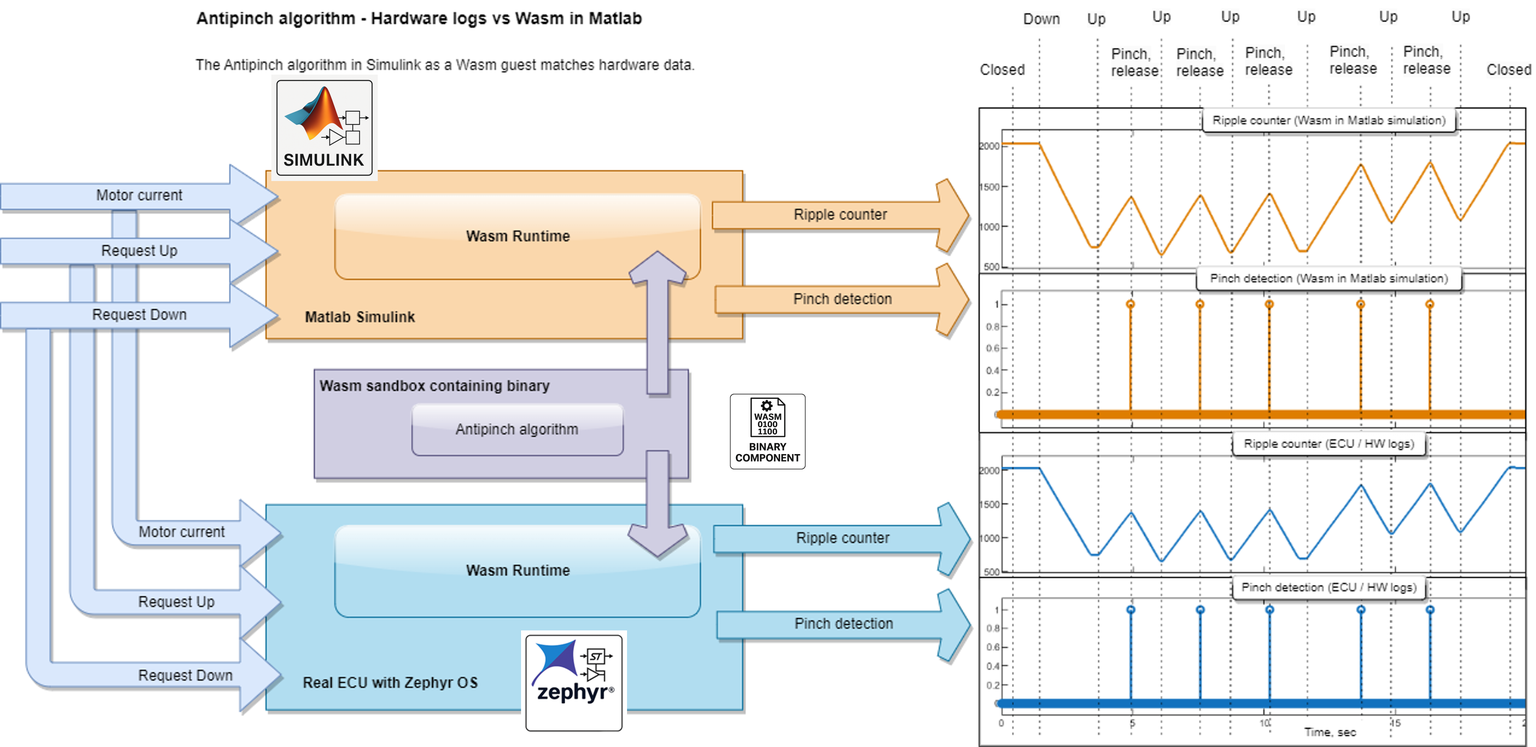
What you see: Sensor and actuator signals feed into two WebAssembly runtimes simultaneously – one running inside Matlab Simulink for simulation, the other on real embedded hardware under Zephyr RTOS. The anti-pinch algorithm is compiled as a Wasm component and runs unchanged in both environments. Exactly the same binary.
From Simulink to the browser: The anti-pinch algorithm, along with simulated sensor and actuator models, was converted from Simulink to C, encapsulated behind WIT interfaces, and compiled once into a Wasm component. The resulting .wasm file runs unchanged in any WebAssembly runtime – whether that's a browser, Simulink, or a microcontroller.
What the demo concretely shows:
- Single artefact – the same
.wasmfiles running here in the browser are designed to run unchanged on the target ECU - Versioned interfaces – WIT interfaces such as
aptiv:antipinch/motor-driver-v2@0.1.0define the component protocol in a machine-readable, toolchain-neutral format
Three WebAssembly components work together:
- Anti-Pinch – Detects pinch forces via motor current measurement
- Motor Driver – Simulates the window lift motor with realistic current behaviour
- Soft Start/Stop – Smooth acceleration and deceleration via PWM ramps
How to Use
- ▲ Up / ▼ Down
- Moves the window. In automatic mode (default) a single click is enough – the window runs on its own until it reaches the end stop or a pinch event is detected. In Manual mode the window moves only while the button is held.
- ⏸ Pause / ▶ Resume
- Freezes the entire simulation – motor, signal graph and controls are suspended. Click again to resume seamlessly.
- Finger Switch & Slider
- Available once the window is more than 14 % open. Shows virtual fingers that can be positioned between 20 %–85 % in the window's path, bounded by the current window edge.
Tip: Best viewed at 1920 × 1080 (Full HD) or higher.
Window Status
Controls
Motor Control Signals
Next: News · Publications